Labels

EN FR

Sunday, February 16, 2014

Frozen city board : small scenery, Scourge destroyers and razor worms

 Some updates on the work on my frozen city board. I started some tree scenery by putting together foamed PVC and cardboard. I then added some rocks and Vallejo liquid grey stone to establish the base.
 I also got a pot of typhus corrosion and ryza rust in the mail. I immediately tested those on the 1/150 cars and buses. I am very pleased with the results. Typhus corrosion is a very liquid textured paint, the color is spot on for old rust effect. The texture is very fine but works very well, especially when dry brushing ryza rust afterwards. Ryza rust is a very bright orange, like what we could call new rust, and it picks up every details that coul be newly corroded. I have other products to produce rust effects but to this day, typhus corrosion and ryza rust are the best way to achieve that.


I just glued the cars and buses to a piece of plasticard with the help of my miniglue gun (one of my best purchase of last year, very handy !).
 Then I used the scenic shovelled snow from deluxe materials, mixed with 50% PVA 50% water. The finished product should looks like shaving foam. With a old brush, i applied it on the plasticard and the cars. 2 hours later it was completly dried and solidified. Very pleased with the end result.


Later this week I began working on my new models. I really like the destroyers models. They look fierce and tough, very bulky ! I painted them by dry brushing white on a black base color.  I applied the same technique to the razor worms. The guns are chrome vallejo model air, with a generous layer of druuchi violet shade (citadel). I then applied some yellow  (vallejo model air) on the energy parts of the guns. I have still to paint the eyes on 3 of the 4 bases, and maybe spend some more time on the guns and the bases.


 The destroyers posing in front of the tree scenery.

Trying a scenic picture of my Scourge, I will have to wait for a sunny afternoon to have good light !


Sunday, February 9, 2014

Frozen city : snow effect review

 For the frozen city, I decided to cover the buildings with snow. I tried several products on my first building, to decide which one is the best for this. One different product on each side of the building.

1. Army painter Battlefields snow : 
In the pot, it is powdery, and really looks like powdered snow. I applied it by mixing it with PVA glue and water, and then tried to mix it with water effect from vallejo to create icicles. Once dried, it looks good, even if a little to grainy for 10mm

 2. Scenic shovelled snow from Deluxe materials
In the pot it looks like icing sugar. I also applied it by mixing it with PVA glue and water. Once dried it looks less grainy than 1. I think this is the product I will use for DZC and 10mm.

 3. Galeforce 9 snow
In the pot it looks like salt. Once applied, same technique as before, it is grainy and not as white as the previous products. Overall it is the one I like the less.

Saturday, February 8, 2014

Frozen city : large building

 This afternoon I decided to finish a large building I designed a long time ago. I already built the layout, but left it half done for some time. It is almost done, even if I am still thinking about the windows, should I just paint them black and then varnish them with gloss varnish, or should I add some more dividers on each floor ?


the building is 24cm high to the top flat roof, and little more overall. There are 2 doors on the first floor.

Thursday, February 6, 2014

Deathwatch, painting black models

I have a full Ravenwing army and also a small deathwatch force. It is a nice color for an army, but getting the shadows and highlights with black is tricky. Often, the finished model looks like more like painted dark grey, instead of pure black.

A few models I painted before achieving the technique I am satisfied with :


After painting a few dozen models with this color, here are my conclusions :

The trick seems to be in leaving larger pure black areas compared to painting and shadowing another colour (like red, or blue).

The detailed step by step for my painting technique for my latest "black" models :

- black base coat from vallejo black polyurethane (airbrush). I found that the black spray from citadel looks instead like a very dark grey. Before I got my airbrush, I often repainted my base colour with vallejo black when I was using the black citadel spray. Vallejo black is a nice, mat black that I find more deep than the citadel black (but it may be a personal bias).

- very light zenital highlight with vallejo dark grey  model air. It should not be too strong, otherwise it will not look like a black model.

- Edge highlighting of the zenital edges with the following colors (vallejo air model) in this order, from dark to light : dark grey, dark blue grey, blue grey, light blue grey, light grey (almost white). On the smallest areas it should be possible to skip entire steps. The trick is to do this on an area maybe of half the size it would be with another color.

If an edge seems too strongly highlighted it is possible to mute it down with some black wash.

Finished model :


Tuesday, January 28, 2014

Frozen cars (continued)

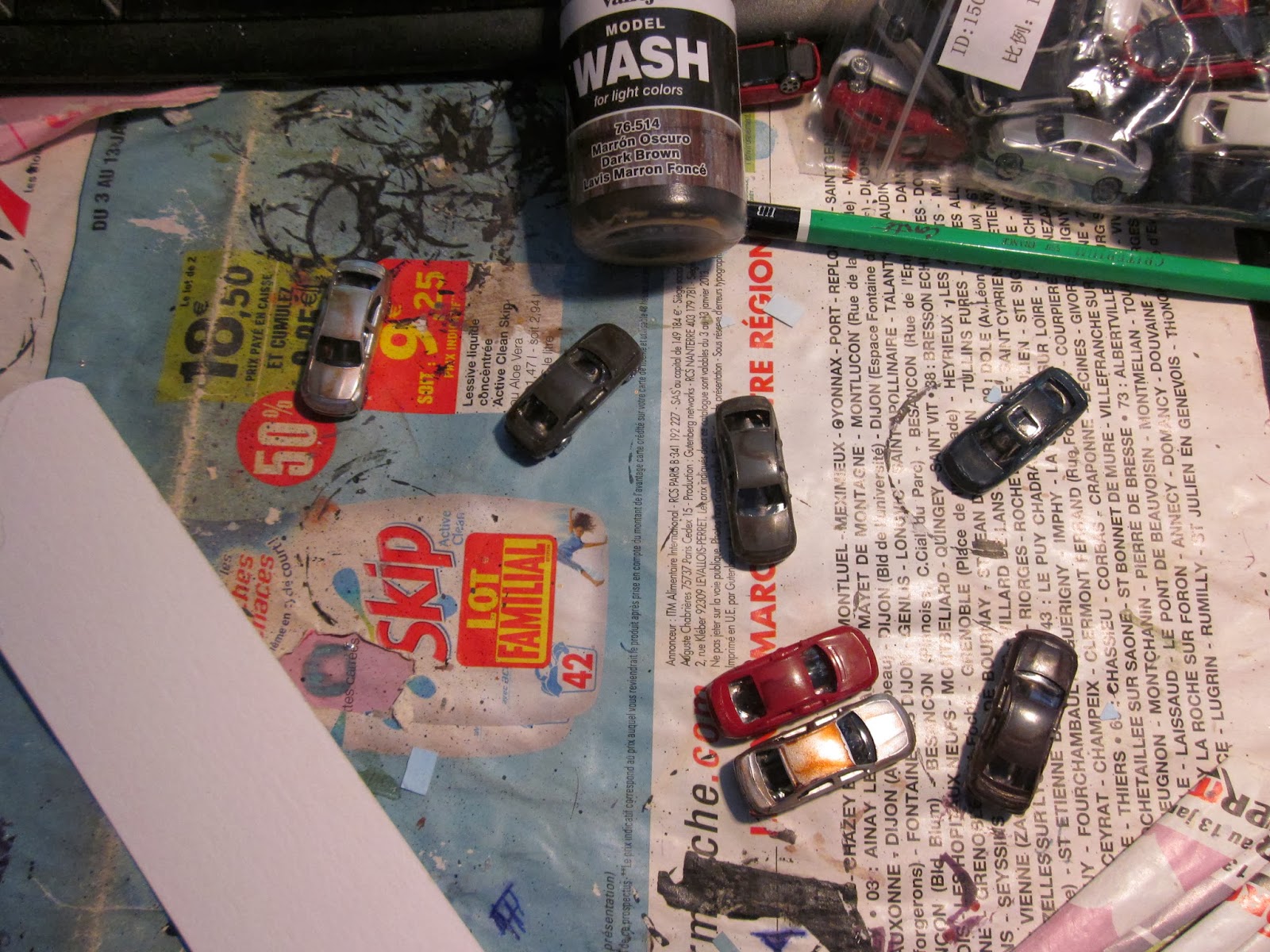
First test with my 1/150 cars, some lined vehicules, recovered by snow. Next time I should put more liquid stone on the cardboard to create a deeper snow, also maybe painting it white before gluing the snow.

Overall I think it looks "ok".

First I painted the cars with vallejo dark brown wash. It doesn't stick too well to the surface of the cars, so next time I think I will use some Strong army painter quickshade that I already have.

 finished result, not yet completely dried.

Sunday, January 26, 2014

New scenery project for the frozen city

I just bought a few things to help me build more non-building scenery for the frozen city board. 100 cars for about 10€, and  buses. The scale seems good, and it should look good once glued and covered with snow and ice.


The cars and buses fit perfectly on the city roads from the starter set posters. I just hope it will be the same with my Games & Gears battleboard (it should).

Thursday, January 16, 2014

First Dropzone Commander game (starter box mission)

At long last, I played the mission from the starter box.

I painted very quickly with some basic colors the few buildings that are nearly done and used those from the starter set to place the gaming table according to the introduction scenario.

The Scourge force, chosen by my opponent
The UCM force, ready do deploy. (Since then I glued the canopies, for fear of losing them...)
UCM side of the board, I decided to focus my objective searching in the building of the middle left.
After loosing their transport full of anti-air on the other flank, the Scourge try to push on my flank. I decided to deploy my own anti-air there, not realizing how deadly scourge infantry can be...
On turn 4, I found the objective and could extract it without a problem with a bear inside a condor. Meanwhile the fight in the center continues...
I lost all my anti-air due to scourge infantry mass fire. My own tanks and infantry doesn't seem to be effective ,because of bad rolling !
Last turn, the scourge infantry managed to find the objective in the center building and extract it, using their APCs and dropship. Scourge victory by victory points !

Overall, a very nice game, I really like the feel of the game.